About event visibility and attendance
Who can see your event and who is invited depends first on place permissions and then on event access type.
Place permissions
Place permissions apply to events, so where you create your event determines who sees it. All place members can see events that are created there, and events show up in activity streams. For more information about permissions, see Content visibility.
Event access types
To further manage access to your event, choose an event access type — Open, Closed, or Private — when creating your event. Note that some of these types may be disabled in your community. Community members can select these access types when creating events, allowing for flexibility in event visibility and attendance.
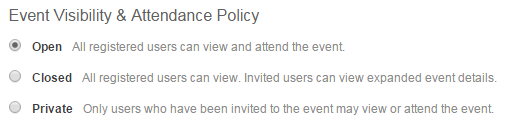
Event access types provide another layer of permissions over the place permissions.
| Event access type | Visibility | Attendance policy |
|---|---|---|
| Open events | Open events can be seen by anyone with access to the place where these events are posted and anyone following the place in a stream. | Everyone is invited, and an RSVP link is visible to everyone until the event is at capacity. |
| Closed events | Closed events can be seen by anyone with access to the place where these events are posted and anyone following the place in a stream. | Only the people you invite can see an RSVP link. For more information, see Inviting people. |
| Private events | Private events can only be seen by people who have been invited. | Only the people you invite can see an RSVP link. For more information, see Inviting people. |
If you create an open event in a private or private unlisted group, everyone in the group is invited, but only the group members can see the event.
Configuring event access types
Event access types can be disabled to limit the choices that community members have in regards to visibility and attendance. To disable event access types, change the corresponding jive.event.eventAccess property to false. For example, if you want to require all events to be open, you can set jive.event.eventAccess.closed.enabled and jive.event.eventAccess.covert.enabled to false. Note that open events can be created in a private or private unlisted group if you don't want everyone to be able to read about or attend them.
Administering Jive Events: For more information about the corresponding system properties, see Event properties.